Tech Blogs
Joe Audette: SEO Phone Spam
I often get these contact form submissions on joeaudette.com and on mojoportal.com where people are pitching to get my site to the top of google, no big deal, I delete them, but yesterday was the first time I got one by phone.
Yesterday at about 2PM I got a phone call on my cell phone from 951-813-2184 that went like this:
- me: hello?
- caller: is this the tree service?
- me: i think you have the wrong number
- caller: are you Source Tree Solutions?
- me: that is my company but it is a software company not a tree service
- caller: oh, well you're listed in the yellow pages under tree service
- me: that's news to me, I didn't know I had a listing in the yellow pages
- caller: well are you interested in getting your site to the top of google?
- me: oh my God, you gotta be kidding me
- caller: well what do you do for advertising
- me: Dude! you don't know the first thing about me, my business or my web site, I don't need your SEO spam phone calls, please never call this number again, click
I chuckled for about 15 minutes after that, but hope it is not the start of a trend of spammy phone calls.
Joe Audette ...
Joe Audette: How To Use jQueryUI Tabs in Right To Left Layout
Recently I've begun using the jQueryUI tabs in mojoPortal as an alternative to YUI tabs. I still like the YUI tabs but there is only 1 skin available currently for YUI tabs, whereas there are a 18 themes for the jQuery UI tabs, so its likely that at least one of them will look good with a particular mojoPortal skin. This has got me thinking about switching to use the jQuery tabs in many or most places where we use YUI tabs. I still need to test a few things like making sure I can use FCKeditor inside the tabs like I can with the YUI tabs. One thing I like about the YUI tabs is that they automatically adjust to right to left layout if they are contained within and element with direction:rtl in the css.
I was worried at first whether the jQuery Tabs would support right to left layout because when I googled for it I could not find any explnations how to make the tabs layout from right to left. I found a number of people asking about it on mailing lists and forums but no-one offering any answers. So I used Firebug to study the css classes assigned to the elements and figured out the things that need to be overridden to make it layout from right to left. I thought I should post it since clearly there are people looking for hep with this. Its actually very straightforward, you include the normal css for the jquery ui theme, and you add another css file below it in the page (it must be lower in the page in order to override the style settings above it in the jquery ui css). There is only a little css needed because we want to override the minimum possible style settings, this is what is needed:
.ui-tabs { direction: rtl; }
.ui-tabs .ui-tabs-nav li.ui-tabs-selected,
.ui-tabs .ui-tabs-nav li.ui-state-default {float: right; }
.ui-tabs .ui-tabs-nav li a { float: right; }
I tested it with all 18 jQuery UI themes and it worked great. I hope this is helpful to others.
Joe Audette ...
Joe Audette: My Personal Phone History
These are all the cell phones I've ever had.
I remember when I first got that Samsung clamshell phone on the left, gosh, how long ago was that 1997, 98 99? Somewhere in there I'm sure. I remember being so excited about that phone when I first got it. As a kid I had always fantasized about those communicators they used on Star Trek and when I got this phone it was like the realisation of a childhood dream. I got rid of my land line pretty soon after that and haven't had one since.
I was pretty excited when PocketPC phones first came out. Being a Web Developer, the idea of always having access to the internet wherever my phone worked seemd like a dream. I think I got that phone around 2002 or 2003 and at the time I gave my old phone to my younger brother Frank who lived in North Carolina (I was living in TN at the time). It really wasn't a compelling internet experience, and though I kept it until long after my service contract expired, I got really tired of carrying around that big phone. I mean if you put it in your pocket people were like "hey is that the internet in your pocket or are you just happy to see me?". It was really a phone that needed a belt clip like Batman, but I really wasn't into that belt clip thing.
So then I got the Razr, must have been around 2004 or 2005, again I gave my old PocketPC phone to my younger brother Frank. I was much happier with the Razr, it was slick, it was small, and it was a joy to stop carrying that old boat anchor PocketPC.
Last month I got an iPhone. Its way beyond any phone I ever imagined seeing in my lifetime. Its got a compelling web surfing experience, and yet it fits nicely in your pocket without raising eyebrows. I know a lot of people like a physical keyboard and those folks tend to like Blackberries. I suppose if I was answering a lot of email with my phone I might wish for a real keyboard too. Honestly I haven't yet answered an email with my iPhone. For me its more about knowing whether I have important mail at any time than actually responding to it from my phone. It can usually wait until I'm near a computer again. After all, I'm near a computer about 95% of the time. For me its just another convenient way to service my internet addiction. I work long days and then finally collapse and watch movies at the end of the day when I can no longer keep going. I used to find myself getting up from the couch a lot just to check if any new mail had come in, or see how many people are on mojoPortal.com. Now I don't have to get up off the couch. In some ways I like the Facebook experience better on the iPhone than on a computer. I love having a lot of my music collection in my phone, love the GPS. Its a really great device.
So I thought again whether I should offer my old Razr to my younger brother Frank. The funny thing is, now that I'm living in North Carolina, I find out he never activated or used any of the phones I ever gave him, thats how I'm now able to take a picture of them all together. He hasn't committed to a new phone contract for like eight years now. He's still using this old monstrosity:
We're talking dinosaur phone. Not only that but he relies on this thing for all his communication and he lost the battery charger years ago, so he can only charge it now in his car and he's been doing this for years. I'd say he's way over due for a new phone.
Joe Audette ...
Joe Audette: Aliens are Not Allowed to Swim Here!
I walk by this sign almost every day when I go for my exercise walks at the park, its always struck me as funny. Today I took this picture with my iPhone.
Joe Audette ...
Michael Hutchinson: MonoDevelop Tips: Document Switcher
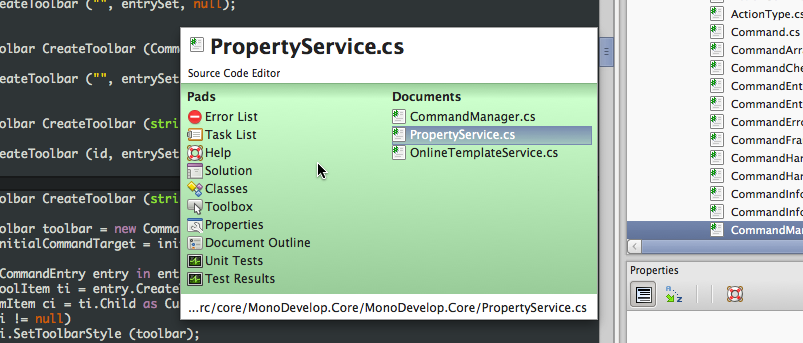
The document switcher is a quick way to switch focus between open documents and pads using the keyboard. It's activated by the Ctrl-tab or Ctrl-shift-tab combinations, and remains open as long as Control remains held down. While it's open, you can change the selection — up arrow or shift-tab moves the selection up, down arrow or tab moves the selection down, and the left and right arrows move the selection between the pads and documents lists. When you have selected the item you want, release Control, and it will be selected.
The documents list is sorted by which have been most recently used, and when the dialog is opened, the first document it selects is the item after the current active document, i.e. the document that was focussed before it, since it's assumed that you don't want to switch to the current document. However, this also make it very easy to switch between a few documents with minimal keystrokes.
Unity Technologies: Unity 3.2 is Available!
Mike Kestner: Signs of Life
Over the past couple evenings, I've pushed a series of commits to github.com which update master to a 2.99.x API level. Several of the samples are still not being built because of 3.0 API breakage. Most of the samples which currently build also run cleanly, but there are some crashes there to address as well.
I've temporarily created a cairo-sharp.dll from the copy of Mono.Cairo we have been carrying in the tree, with a few updates to expose some of the new 1.10 API. This will likely get merged back into the mcs/class tree, but it's a convenient place for us to move fast with fleshing out the new bits.
The generated APIs are completely unaudited at this point. The improvements in the external Gio and Builder bindings since they spun off remain unmerged. There is plenty of work to go around if people would like to jump in and help. We are going to need migration docs, new API docs, the list goes on...
Since people are likely wondering, the module still starts from a C parse. I have experimented with starting from GIR format but feel at this point, given the current tooling state, that it will be quicker to get to 3.0 using the existing GAPI parser for gtk-sharp. Since this is getting long already, I'll expand on the reasons in another blog, plus talk about the approach I think we can take to begin incorporating GIR as a starting point in new bindings.
This App Is Your App
One of the challenges existing Mac developers face with the Mac App Store (MAS) is whatever copy protection you have been using up until now has to be thrown out in favor of a protection scheme based on Apple’s App Store “receipts,” a tiny cryptographically signed file they place inside purchased applications that let your app confirm the authenticity of an application upon launching (and at any other time).
This leads to a conundrum if you continue to sell software directly, or offer preview beta releases for direct download. How can you offer access to these releases for customers who purchased through the MAS and thus do not have the “Registration Code” that direct-purchase customers receive? Apple provides no means of determining the identities of, or contact information for, authorized MAS customers. But even though I don’t know who these customers are, I want to treat them as first-class customers in every regard.
For me, I decided that the compromise is to provide, for those MAS customers who want it, full access to the direct-download versions of my software. Today, any customer who buys a MAS edition of my applications will find that, after running that edition at least once, they are automatically authorized to run direct-download versions of the app from that time forward.
A Recipe for Mass AuthorizationHow did I achieve this bit of wizardry? And more importantly, how can you, or other developers whose apps you love, achieve the same thing? There are three major code-level changes that I needed to make. I’ll discuss those changes, and some of the potentially non-obvious considerations to keep in mind while making them.
-
The MAS edition must stash its receipt somewhere obvious for the direct-download edition to find it. Because both editions of my app share a common Application Support folder, I chose to store them here. Inside the Application Support folder, I create a subfolder called “App Store Receipts” that contains the pertinent receipt files for this app.
Why a folder? Because a customer may sync or copy their App Support folder across various Macs, I chose to store each receipt keyed by the computer’s GUID, which is derived from its wired ethernet MAC address. Developers who have implemented app store authentication will be familiar with this value.
-
The direct-download version must, in the event it is not already authorized by a standard registration code, look for secondary validation in the form of a receipt in the aforementioned location. If it finds a receipt, the same type of validation is performed on the receipt as would be performed in the MAS edition.
You will want to apply some lenience when interpreting the validity of the receipt. For example, you probably want a receipt authorizing version “3.0″ to also be considered valid for “3.0.1″ or “3.0.1b1″. Similarly, if you use separate bundle IDs for your MAS and direct-download editions, you will want to consider the MAS bundle ID as valid for the direct-download version.
-
If you used a different bundle ID for your MAS and direct-download editions, then for the sake of the users sanity and yours, you probably want to implement some kind of transparent migration of preferences from one edition to the other. You don’t want customers to have to go in and reset all their preferences when they switch, and it can be annoying as a developer as well.
I had some preference migration code around from when I transitioned MarsEdit and Black Ink from their previous companies’ bundle IDs to mine. I reused that transition code, with a bit of careful but appropriate logic: if the other bundle ID was modified more recently than mine, then import it and replace my defaults. The same logic is applied in each edition so that whatever version you run, you’ll feel as though you’ve picked up all the latest preferences from the last time you used the app.
With these changes in place, I have the flexibility to offer direct-download versions of my software to any MAS customer who asks for it, or for customers who I request the assistance of in testing a pre-release bug fix. In most cases, I can just ask the customer to run the app. In the worst-case scenario, when a receipt has not yet been “stashed,” I have only to ask the customer to run the MAS edition once before trying the newer release.
Pitfalls and DownsidesThis solution isn’t perfect. In particular, it brings MAS customers into the fold for direct-download software, but does nothing to soothe the existing and new direct-purchase customers who wish for access to the benefits of the MAS: sharing reviews, mass-updating purchased software, etc.
Worse, it leads to a potentially confusing situation where a customer may be running version 3.0 of an application that they direct-downloaded before Apple had approved it. When Apple does approve it and it goes live on the MAS, they are notified inside the App Store about the available update, but when it does update, it will update the previously installed MAS version, and not the direct-downloaded one. To benefit from the Red Sweater compromise, customers need to embrace the mental model that MAS and direct-download versions of the application are fundamentally different, and need to be managed and stored separately from one another.
I believe that the people this compromise serves are in general a more technically astute type of customer who will be able to embrace this difference, or will understand it with little explanation on my part. The less technical customers are not liable to be on the lookout for beta releases or “day of” releases of new software, and will happily wait until the MAS notifies them of a standard, Apple reviewed update.
Michael Hutchinson: MonoDevelop Tips: Suggestion Mode
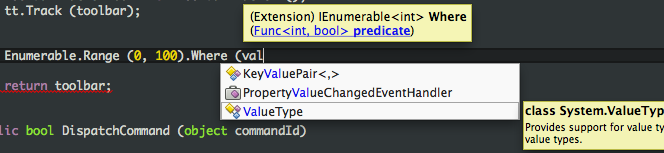
The default mode of the code completion list is to complete the symbol that's being typed. Whenever the completion engine can determine that you are typing an existing symbol (such as a type name, variable name or member name), it automatically triggers the completion list and populates it with all the values that are valid at that point. As you type while the list is open, the list's selection updates to match what best fits what you're typing, and you can manually change the selection using the up/down arrow keys. When you press space, enter, tab, or any punctuation, the completion list "commits" the selection into the document, so you don't have to type the rest of the word manually. This is incredibly useful when you get used to it.
Sometimes the completion engine cannot provide a complete list of valid values, for example when you are defining a lambda at the point that you pass it to a method. In such cases, when you need to type a value that's not in the list, it would be very irritating for the list to commit its best match and overwrite what you're typing. Instead, the completion list goes into suggestion mode.
In suggestion mode, the selection highlight in the list is a rectangle around the selection, not a solid block. When the list is in suggestion mode, it will only commit on tab or enter, so you won't commit accidentally while typing a word. If you use arrow keys to change the selection, the list will go back into completion mode and the highlight will become solid.
Some users like to write code out of order, for example using symbols that don't yet exist, and then defining them symbols later, or writing code that does not parse correctly and fixing it up. Completion mode really makes that style of coding hard to do. The answer is a command that toggles the list into suggestion mode. You can access it via the Edit->Toggle Completion Suggestion Mode menu item, or the Alt-Shift-Space key binding. Once the list is toggled into suggestion mode, it will stay that was until you toggle it back. This it useful because you can switch back and forth as it suits you.
Black Ink 1.3
I am happy to announce that after a short, productive beta release period, Black Ink 1.3 is now available for direct download and through the Mac App Store (has been approved but may take a little while to update in the store).
- New web puzzle sources
- LA Times Daily & Sunday
- Newsday
- USA Today
- Universal
- Rework the Startup preferences to be more user-friendly with reopening puzzles
- Give keyboard shortcut Cmd-K to “Check Current Letter”
- Now includes automatic crash reporter
- Fix a bug that caused Black Ink to hang when printing on rare occasions
- Fix a bug that caused puzzle timer to be placed off screen edge
- Fix a bug that could prevent puzzle solving menu items from being enabled
- Fix a bug that prevented canceling a stalled puzzle download from working
Enjoy!
Michael Hutchinson: MonoDevelop Tips: Fullscreen Modes
Sometimes it's useful to be able to focus only on your code without the distractions of the pads and the rest of your desktop. MonoDevelop has two ways to make this easier.
The Maximized View can be toggled by double-clicking on the document tab, or using the context menu on the document tab and selecting Switch maximize/normal view. When in maximize view, all open pads are auto-hidden at the sides of the MonoDevelop windows, and all toolbars are hidden (everything in the toolbars is also accessible from the menus).
The Fullscreen View can be activated using the View->Fullscreen menu command. This makes the MonoDevelop window take up the entire screen, hiding the taskbar and the window border.
Both view modes can be used together to maximize the document area as much as possible.
Ruben Vermeersch: Post-FOSDEM 2011 / The Trollcat experiment
The Mono Developer Room
The second edition of the Mono Developer room was once again a great success. Good talks, nice atmosphere and some interesting discussions. Slides will be online soon, unfortunately no video recordings this year.
The trollcat experiment
A couple of months ago while sending out the call-for-papers for the 2011 Mono room, I added this question to the submission form:
The majority ticked "Yes".
Looking back at my statistics from last weekend, over 90% of the speakers did in fact include some imagery of opinionated animals or cartoon figures, often comically yet clearly strengthening the discourse. I would like to present this observation as a data point in the ongoing research on the finer points of trollcats in contemporary society which is being carried out by Miguel for some time now.
Kenneth Pouncey: Cocoa?s Application Icon Badge
Ivan Zlatev: PicasaUploader 0.5.4 released
I have just released a new version of my PicasaWeb Uploader tool. This is a maintenance release to fix issues with large video uploads and to port to the new GData API.
Jb Evain: TechDays 2011
Mercredi, j’aurai l’opportunité de présenter Mono et son écosystème pendant les TechDays Microsoft.
Ce sera l’occasion de faire le point sur les dernières nouveautés de Mono, et de montrer comment réutiliser ses compétences .net et partager son code C# pour cibler des plateformes en vogue, comme l’iPhone et l’iPad avec MonoTouch, Android avec MonoDroid et Mac OS X avec MonoMac.
Si vous ne pouvez pas assister à la session, je serai aussi disponible sur le stand alt.net pour discuter de tous ces sujets. Venez nombreux !
Joe Audette: mojoPortal 2.3.6.2 Released
I'm happy to announce the release of mojoPortal 2.3.6.2, available now on our download page.
This is a minor release with just a few bug fixes, the primary purpose of this release is to fix a problem in our Shared Files feature and in our alternate File Manager when running under Medium Trust hosting. In the previous release of version 2.3.6.1 we had changed to strong name signed assemblies for NeatUpload and for the NeatUpload Greybox Progress bar. This strong signed version of NeatUpload allows it to be installed in the GAC (Global Assembly Cache) on the server so it can work in Medium Trust, but there was a bug in the previous release because the NeatUpload.GreyboxProgressBar.dll was not compiled with the AllowPartiallyTrustedCallers attribute so it caused an error under Medium Trust. This release addresses that problem, it just required adding the needed attribute and re-compiling the NeatUpload.GreyboxProgressBar.dll. Since most shared hosting uses Medium Trust we felt it important to get a fix out for this quickly.
Fixed Bugs- Fix error under Medium Trust in Shared Files and in the Alternate File Manager
- Fix bug in SQL CE data layer when creating new sites
- Fix bug where file manager did not overwrite existing files
- Fix redirect bug in Search Input that could happen on blog detail pages
- Fix bug in blog when using google maps (this bug was introduced in version 2.3.6.1 when we added an option to use Bing maps in the blog)
- Upgrade from CKeditor 3.5 to 3.5.1
- Updated Italian resources from Diego Mora
- Updated Persian resources from Asad Samarian
- Updated Portuguese (Brazil) resources from Fabio Mastaler
- Updated French resources from Yves Jadin
- Updated German resources from Jan Aengenvoort
- Updated Spanish resources from German Barbosa
- New partial Arabic translation from Sameer Alomari
Follow us on twitter or become a fan on Facebook
Joe Audette ...
Michael Hutchinson: MonoDevelop Tips: Import Type
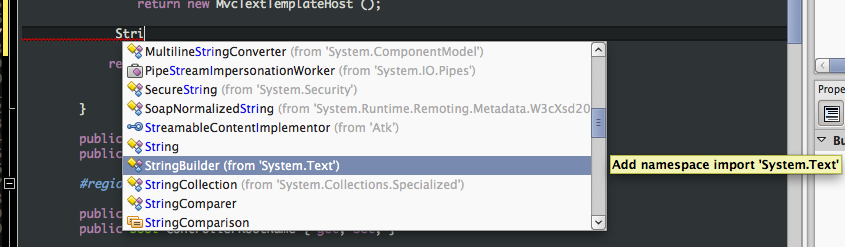
One of my favourite features that we added to MonoDevelop 2.4 is the "import Type" command. It is accessed using the keybinding Ctrl-Alt-Space, and shows a list of all types in all namespaces in all referenced assemblies:
You can use our completion list filtering to find the type you're looking for, then, when you commit the selection from the list, MonoDevelop automatically adds the "using" statement to the file. For example, using StringBuilder is as easy as StrB even if you don't yet have using System.Text; at the top of the file.
Michael Hutchinson: MonoDevelop Tips: Completion List Filtering
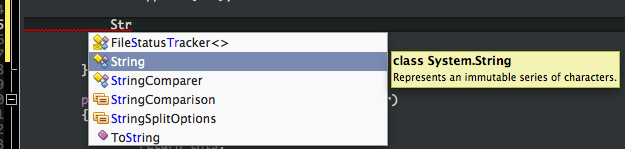
MonoDevelop makes it really easy to search the code completion list. As you type, it breaks down the string you enter into word fragments on camelCase boundaries, then matches these fragments against the beginnings of the words in the completion list. The list is filtered to show only the items that match, and the matched parts are helpfully highlighted in blue:
This makes it much faster to select items from the list, since you can uniquely select items in the list without typing them out in full or using the arrow keys. For example, "StBu" will match "StringBuilder". It's also very useful for searching for items in the list if you're not sure what you need. For example "Str" will match both "StringComparison" and "ToString" and anything else with "Str" in its name.
If you use completion matching to filter the list then refine your selection with the arrow keys, when you commit an item from the list (using space, enter, tab, etc.), MonoDevelop will remember your choice. The next time you type the same string, it will automatically select the item you chose the previous time. However, if you type the exact name of something in the completion list, it will always match that item.
openmoko-fr: Communauté Francophone : Janvier 2011
Voici les nouvelles du front Openmoko, avec un peu de retard.
ActualitésVoici une sélection d'informations intéressantes :
- Sortie de EFL version 1.0
- Une page wiki FOSDEM 2011 a été créée sur openmoko.org
- Dernières nouvelles de SHR : il est question de FSO, SMS, VoIP, EFL 1.0, Palm Pre, HTC Dream et Nokia N900
- Sorite de Qtmoko v32
- Open Silicium est un nouveau magazine des éditions Diamond dédié à l'embarqué et à l'opensource
Consultez également la dernière page Community Updates pour plus d'informations.
En janvier a été publiée l'annonce du FOSDEM 2011 qui se termine en ce moment même.
J'ai une pensée pour les chanceux qui s'y trouvent, comme Asthro qui nous a fait un retour en direct.
Asthro avait également rédigé un article sur le nouveau thème Faenqo pour QtMoko.
C'est vrai qu'il est plutôt réussi :
Voici l'état actuel du forum :
- 15 744 messages
- 783 inscrits
- 1 383 discussions
Souhaitons la bienvenue à : lsam, WhilelM et robin
Voici une sélection non-exhaustive des nombreuses discussions du mois.
Communauté :
- Bonjour ! (5 messages)
- Nouveau et emballé (3 messages)
- Cyberesprit se présente (1 messages)
- FOSDEM 2011 (3 messages)
Logiciels :
- Neoinput (9 messages)
- Android 1.5 "impossible d'installer ... sur ce téléphone" (8 messages)
- [QtMoko] v31 : pb Wi-Fi et autonomie ? (8 messages)
- QtMoko v31, un peu paumé... (7 messages)
- [QtMoko] nouveau theme : AsthroMod (7 messages)
- SHR-U et GPRS (6 messages)
- QtMoko v32 (expérimental) (6 messages)
- [QT V31]Pb connection web (5 messages)
- nouvelle SHR-T (4 messages)
- [SHR-T] internet (3 messages)
- Android Froyo daily : 05-10-2010 (3 messages)
- [SHR] pymail : Notifier de mail (2 messages)
Matériels :
- GTA04 (18 messages)
- [touch] ecran tactile pété ... moi aussi (7 messages)
- Geeksphone à 159€ : bonne affaire ? (5 messages)
- De la concurrence pour Always Innovating (3 messages)
- (VDS) Open Moko FreeRunner Paris (1 messages)
Projets :
- MiniMoko : smartphone Openmoko / Allways Innovating (1 messages)
- Sleepytux : Une application android pour définir des profils. (25 messages)
Divers :
- nouvelle freebox - freephonie (6 messages)
- Geek'sPhone one un concurrent du FreeRunner? (4 messages)
- Linuxconf.au, conférence sur la téléphonie (2 messages)
- spammeur(s) supprimé(s) (1 messages)
RAS en janvier !
Statistiques du site- Graphique des visites :
- Nombre de visites par mois :
- Répartition par pays :
- Visites par jour :
- Statistiques du forum :
- Les statistiques du wiki :
Je n'ai pas grand chose à dire ici (et je veux qu'on le sache ! ) si ce n'est que j'attends avec impatience les retours du FOSDEM 2011.
Une fois de plus je n'y suis pas allé je vais encore le vivre par procuration.
Mais l'année prochaine j'en suis sûr, ce sera la bonne !
miguel de icaza: MonoMac hotfix
Hylke Bons warned us of a limitation in our MonoMac packager so we are issuing a new MonoMac refresh that fixes various bugs:
- Supports using Mono.Posix.dll in packaged bundles.
- Supports using System.Drawing in packaged bundles.
- Fixes various BCL P/Invokes problems (we forgot to ship the config file :-)
- No longer requires Mono 2.8.1, works with any mono 2.8+
Follow the standard instructions to update your MonoMac add-in.
Hylke then got his native Mac client for SparkleShare (a DropBox-like system, but backed up by Git or any Git hosting sit) working as a bundle on OSX.